Enhancing Usability in
Molarray Medical Device
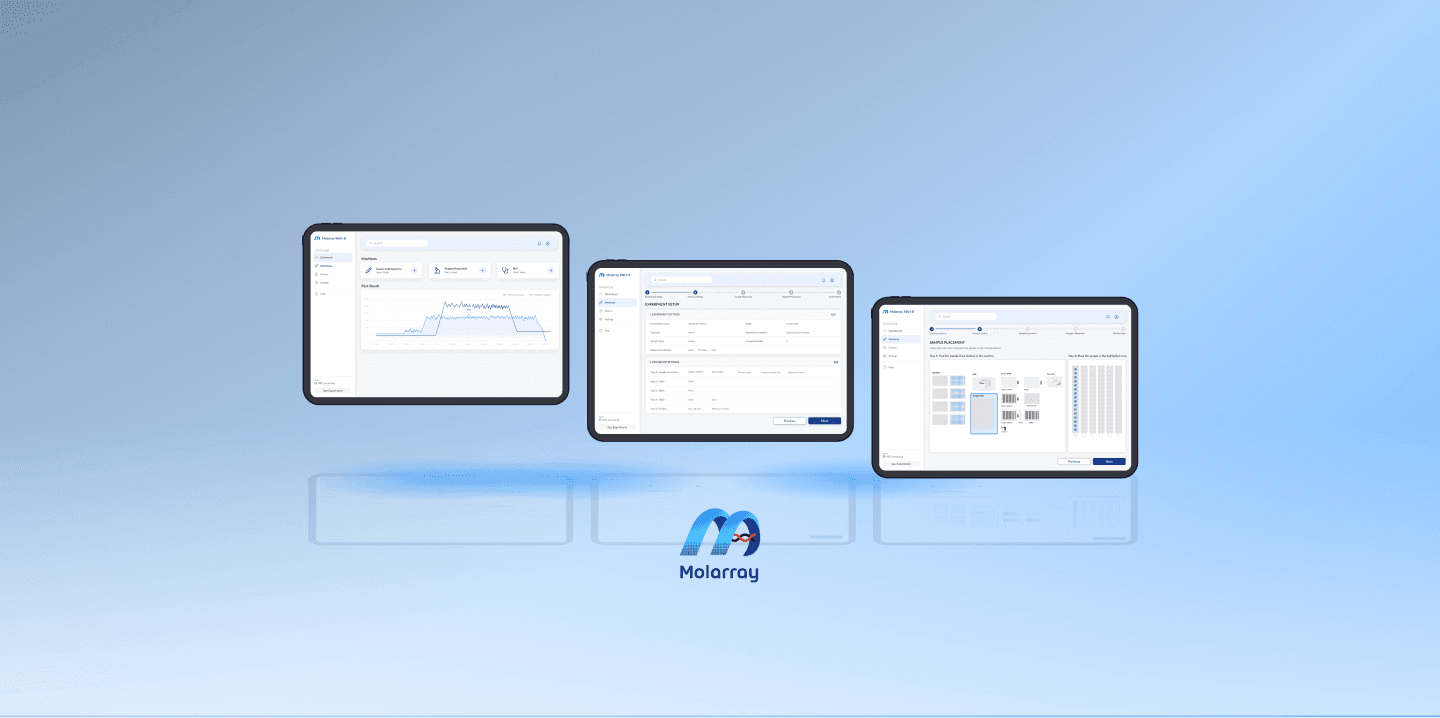
Molarray is a biotech company specializing in liquid handling systems for diagnostic testing and research. As the sole designer, I led the design of a healthcare application interface for molecular diagnosis products and digital screens, designed an operational dashboard to simplify user flow, and conducted user research through collaboration with stakeholders.
Molarray is a biotech company specializing in liquid handling systems for diagnostic testing and research. As the sole designer, I led the design of a healthcare application interface for molecular diagnosis products and digital screens, designed an operational dashboard to simplify user flow, and conducted user research through collaboration with stakeholders.
Industry
Industry
Healthcare, IoT
Timeline
Timeline
2022
Team
Team
1 PM, 1 Designer, 10+ Developer
Overview
🧠
Background
Molarray, a biotech firm specializing in automated liquid handling systems, provides diagnostic tools used in high-precision laboratory environments. However, the complexity of operating its molecular diagnostic devices created barriers for adoption—especially among lab technicians performing daily setup and operations.
My goal was to lead the end-to-end UX transformation of the product interface, improving usability, reducing error-prone steps, and streamlining onboarding and experimental workflows.
Molarray, a biotech firm specializing in automated liquid handling systems, provides diagnostic tools used in high-precision laboratory environments. However, the complexity of operating its molecular diagnostic devices created barriers for adoption—especially among lab technicians performing daily setup and operations.
My goal was to lead the end-to-end UX transformation of the product interface, improving usability, reducing error-prone steps, and streamlining onboarding and experimental workflows.
⚠️
The Challenge
Despite the advanced hardware, the digital interface fell short:
The onboarding process was long, redundant, and lacked intuitive guidance.
Users struggled with complex setup procedures, leading to frequent errors and experiment failures.
Mid-experiment issues often required restarting entire protocols, frustrating technicians and wasting resources.
The needs of different user types (e.g., research labs vs. diagnostics clinics) were not being met.
These usability issues directly impacted system adoption, experiment reliability, and customer satisfaction.
Despite the advanced hardware, the digital interface fell short:
The onboarding process was long, redundant, and lacked intuitive guidance.
Users struggled with complex setup procedures, leading to frequent errors and experiment failures.
Mid-experiment issues often required restarting entire protocols, frustrating technicians and wasting resources.
The needs of different user types (e.g., research labs vs. diagnostics clinics) were not being met.
These usability issues directly impacted system adoption, experiment reliability, and customer satisfaction.
Discovery & Research
🔍
Discovery & Research
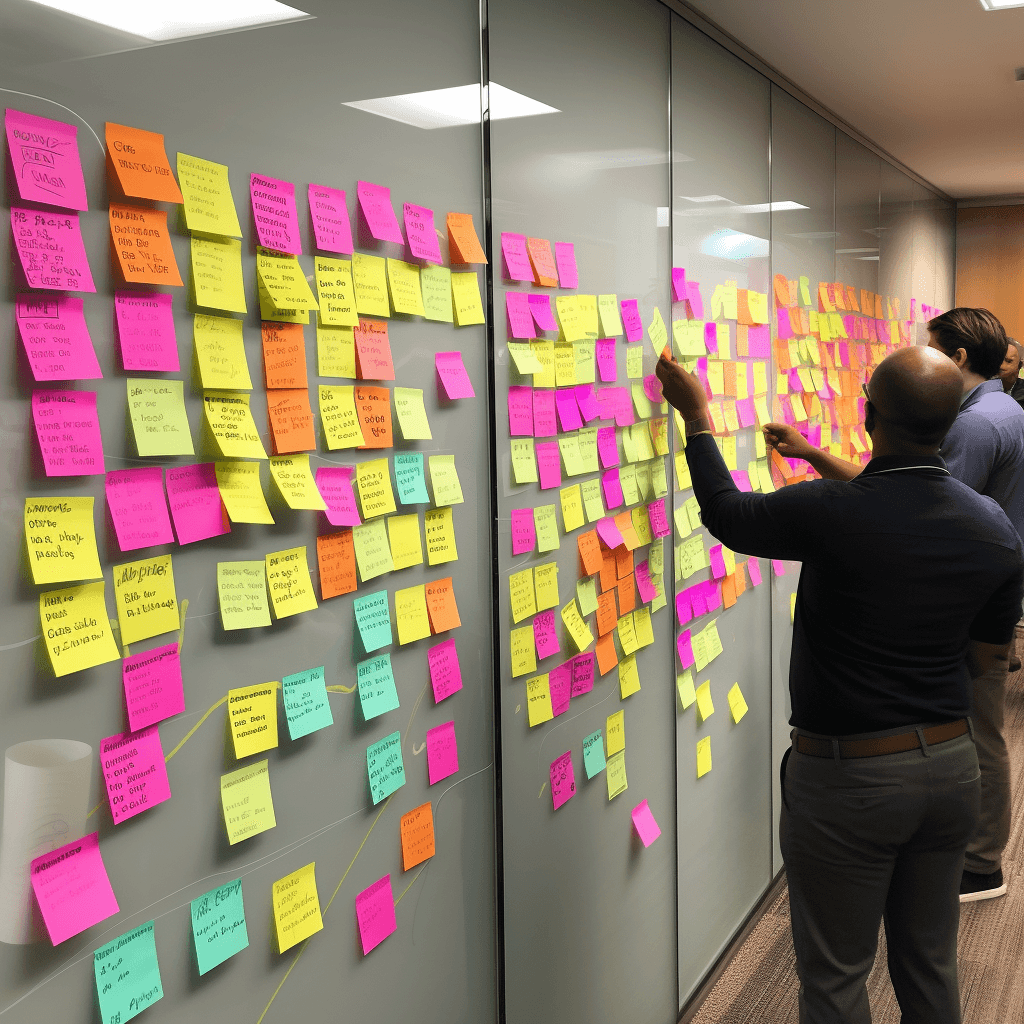
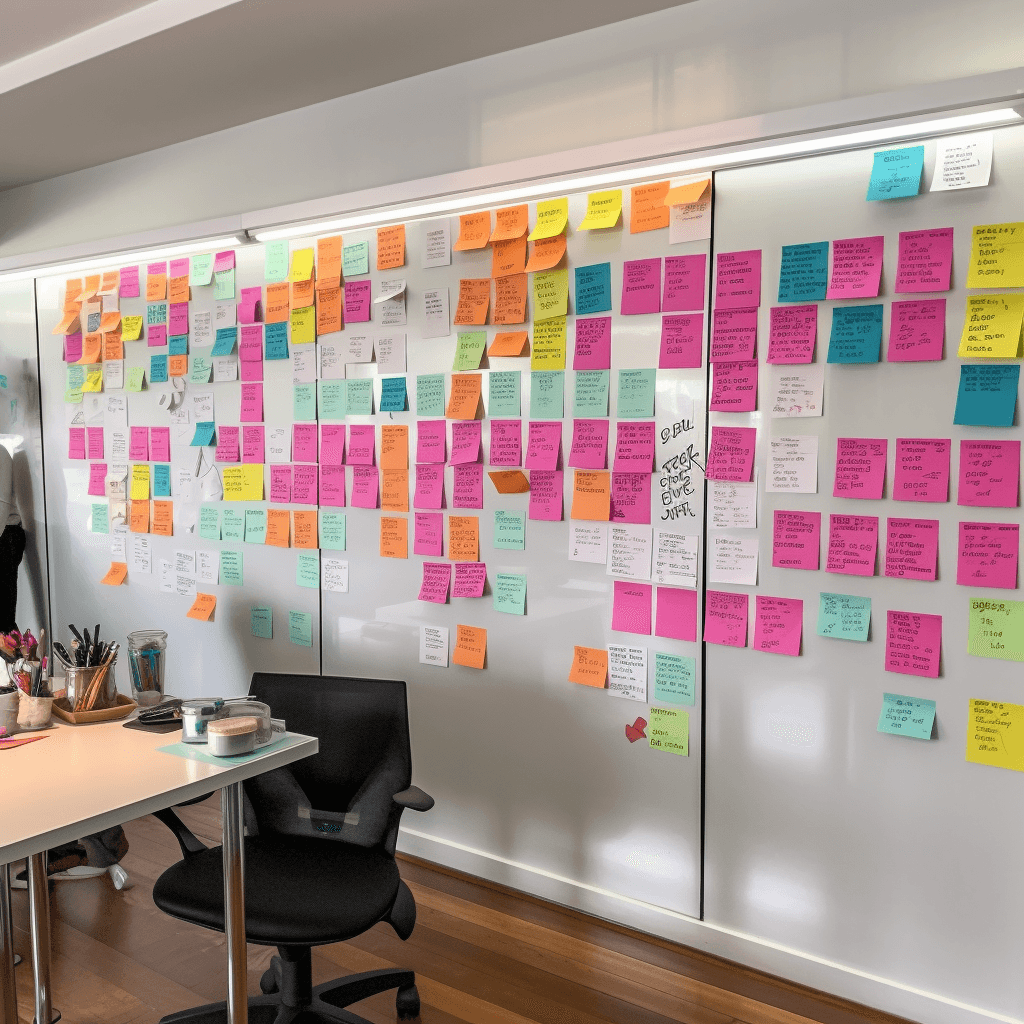
I conducted structured interviews with:
Internal product and engineering stakeholders
Founders and leadership
Feedbacks:
Onboarding and setup were the biggest friction points.
Experiment steps were fragmented and not aligned with how technicians naturally work.
Users lacked visibility and confidence in system status during operations.
I conducted structured interviews with:
Internal product and engineering stakeholders
Founders and leadership
Feedbacks:
Onboarding and setup were the biggest friction points.
Experiment steps were fragmented and not aligned with how technicians naturally work.
Users lacked visibility and confidence in system status during operations.

Key Insights
Key Insights
How can we improve the match rate and user experience for Didi's Demand-Response Transit (DRT) system?
🚨
Misalignment Between Leadership & Real Users
During initial stakeholder and user interviews, we uncovered a critical disconnect:
Primary users are researchers, professors, and doctors 🧪Primary users are lab technicians, junior researchers, and students 🧫Highly trained experts with strong domain knowledge 🧠Mixed experience levels, often new to the system and under training 📘Comfortable with complexity and technical terms 🧬Need simple instructions and guided workflows 🚸
During initial stakeholder and user interviews, we uncovered a critical disconnect:
👔 What Leadership Thought
Primary users
Researchers, professors, and doctors
Characteristic
Highly trained experts with strong domain knowledge
Terminology
Comfortable with complexity and technical terms
👩🔬 What Actually Happened
Primary users
Lab technicians, junior researchers, and students 🧫
Characteristic
Mixed experience levels, often new to the system and under training
Terminology
Need simple instructions and guided workflows
🎯
Aligning Expectations
Hosting the Meeting to Receive Alignment:
Clearly define the user personas and design goals, then align with leadership through stakeholder communication to secure buy-in and support for the new design direction.
Hosting the Meeting to Receive Alignment:
Clearly define the user personas and design goals, then align with leadership through stakeholder communication to secure buy-in and support for the new design direction.
📝
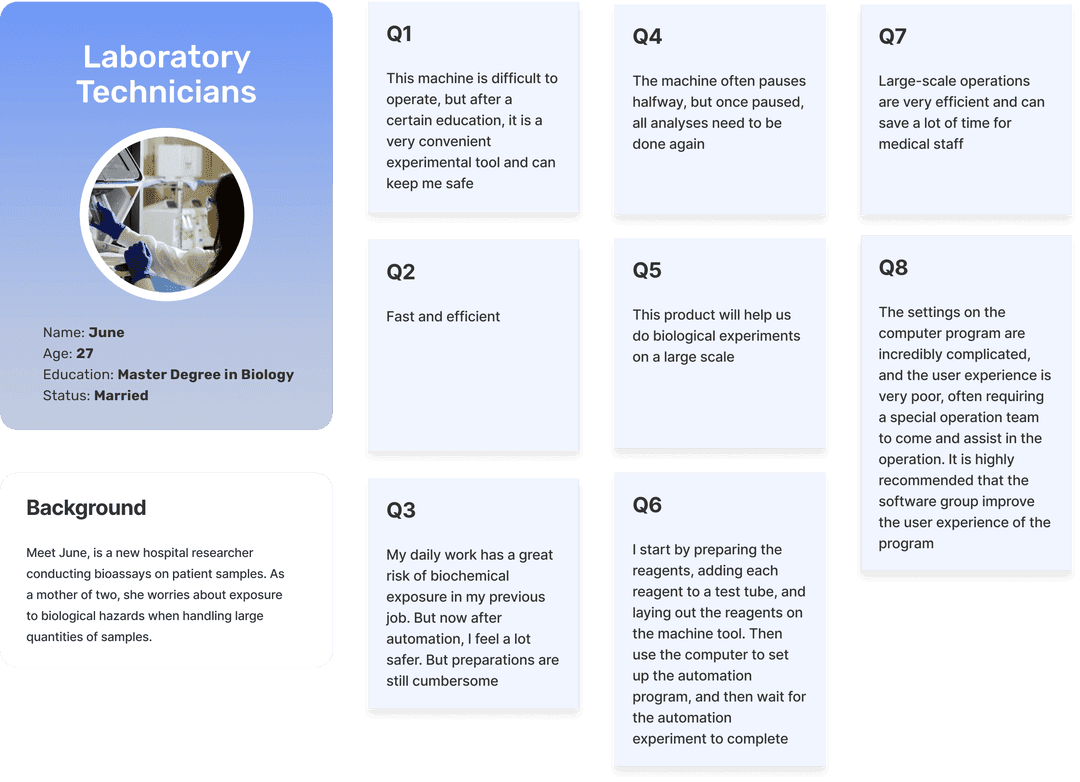
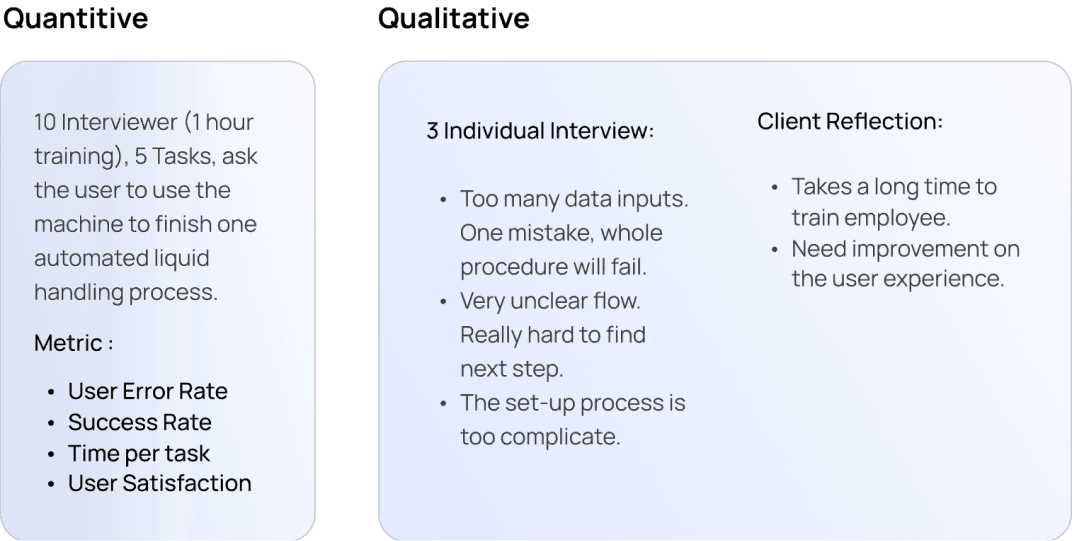
User Research and Persona
Primary Users: Laboratories and diagnostic centers.
Primary Clients : Laboratory technicians (over 70%), who need to set up and run experiments quickly, safely, and efficiently.
User Pain Points:
Lengthy, error-prone processes.
Complex pre-experiment preparations.
Occasional mid-experiment stoppages forcing a complete restart.
Primary Users: Laboratories and diagnostic centers.
Primary Clients : Laboratory technicians (over 70%), who need to set up and run experiments quickly, safely, and efficiently.
User Pain Points:
Lengthy, error-prone processes.
Complex pre-experiment preparations.
Occasional mid-experiment stoppages forcing a complete restart.
🛠️
UX Strategy Shift
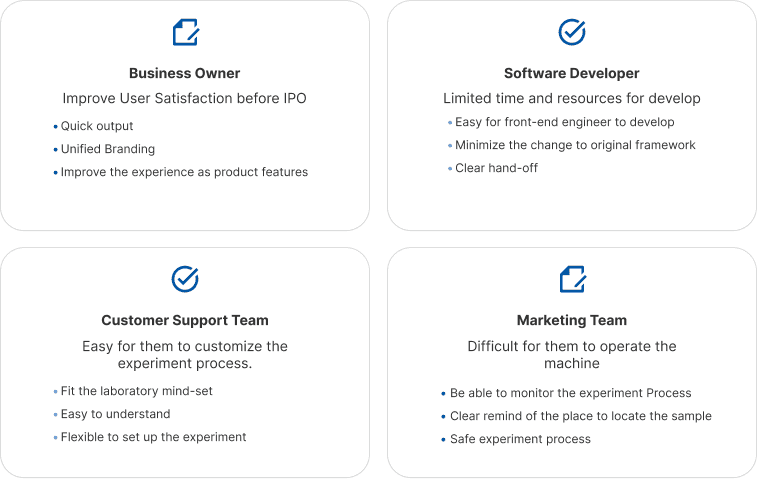
We pivoted the design to better serve actual daily users :
🧭 Introduced a step-by-step wizard for experiment setup
💬 Replaced jargon with plain language instructions
🔁 Added clear feedback and error recovery
🖼️ Used visual cues (diagrams, icons) to reinforce correct actions
We pivoted the design to better serve actual daily users :
🧭 Introduced a step-by-step wizard for experiment setup
💬 Replaced jargon with plain language instructions
🔁 Added clear feedback and error recovery
🖼️ Used visual cues (diagrams, icons) to reinforce correct actions
🧩
User Journey and Process Analysis:
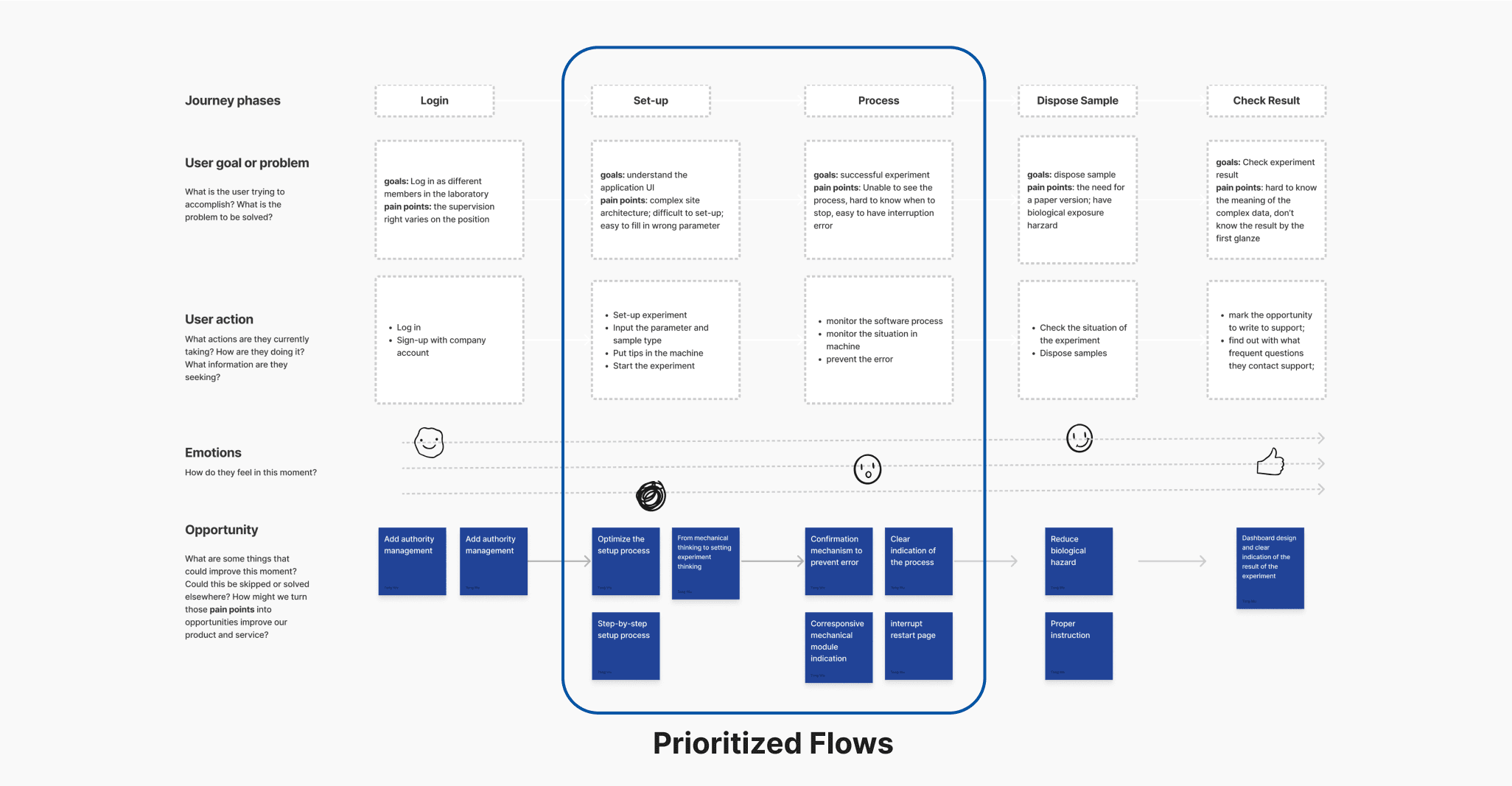
Through user journey mapping and process analysis, we identified that technicians encountered the most errors during the experimental setup and operation phases. In contrast, login and sample disposal stages were relatively smooth, indicating that the core issues were concentrated in the setup and data handling stages.
Through user journey mapping and process analysis, we identified that technicians encountered the most errors during the experimental setup and operation phases. In contrast, login and sample disposal stages were relatively smooth, indicating that the core issues were concentrated in the setup and data handling stages.
I mapped the full user journey, identifying critical drop-off points.
🟥 Pain Zones: Experimental setup, protocol configuration
🟩 Stable Zones: Login, sample disposal
This analysis confirmed the need to streamline the experiment flow and improve error recovery mid-process.
I mapped the full user journey, identifying critical drop-off points.
🟥 Pain Zones: Experimental setup, protocol configuration
🟩 Stable Zones: Login, sample disposal
This analysis confirmed the need to streamline the experiment flow and improve error recovery mid-process.
Prioritize the Work
🧭
Prioritized Improvements
Based on user research and stakeholder feedback, we prioritized the most impactful improvements:
Redesigned the core workflow to streamline experimental setup and reduce redundant steps.
Revamped setup instructions with simplified language, visual aids, and interactive guidance.
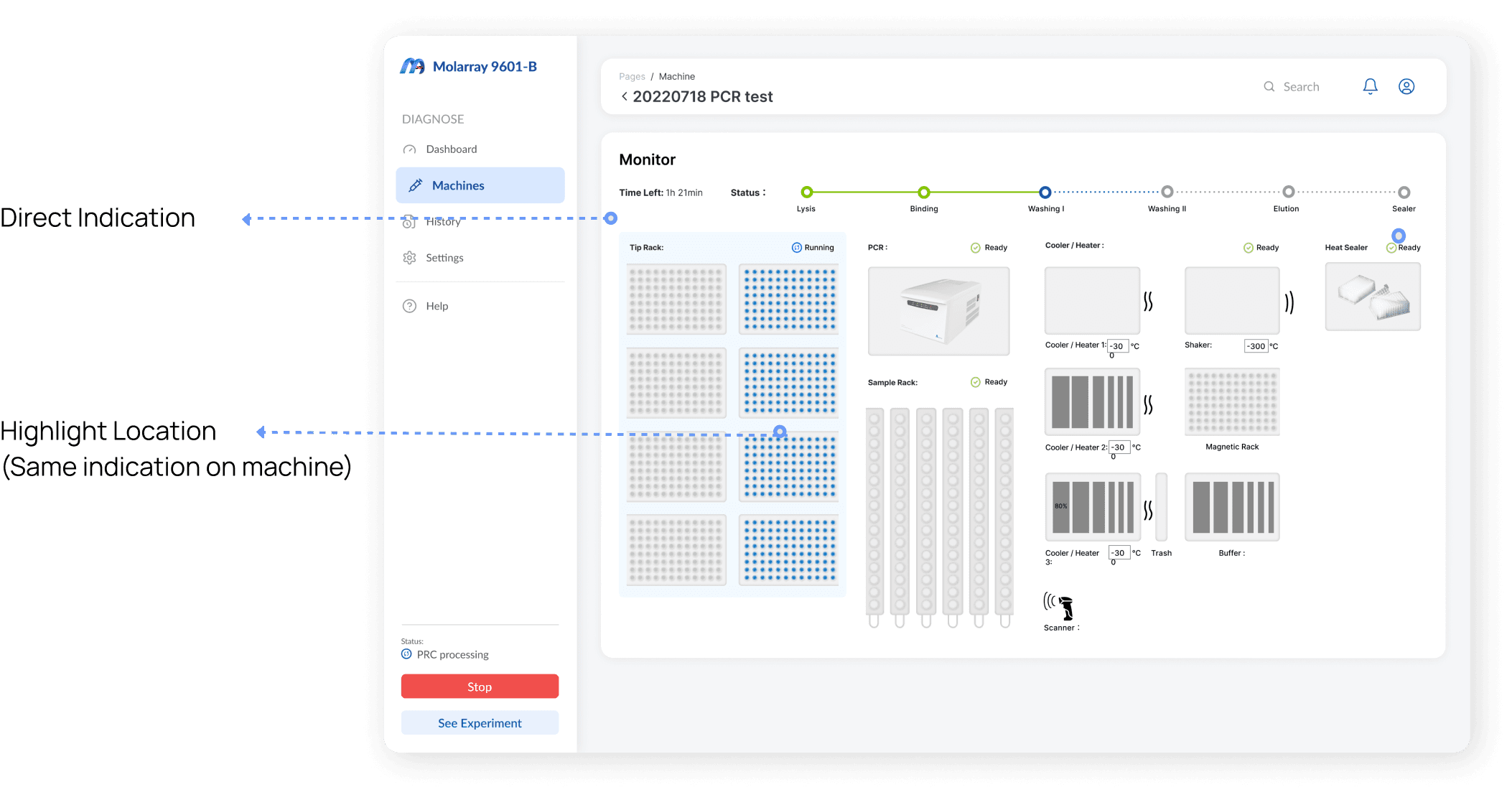
Implemented a real-time monitoring screen to give users visibility into machine operations and reduce uncertainty.
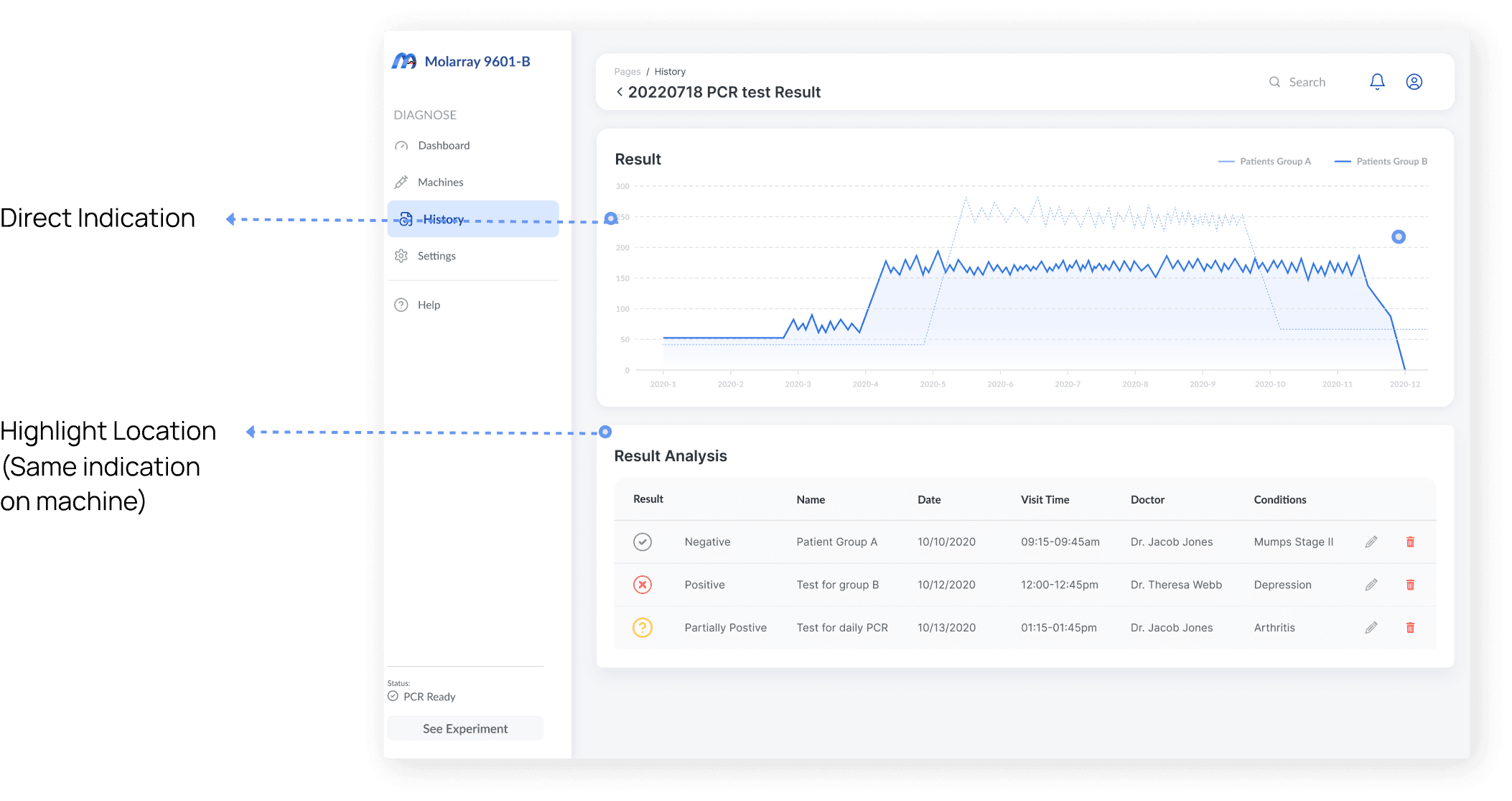
Refined the data dashboard for clearer results, faster interpretation, and easier decision-making.
These priorities ensured the design directly addressed the pain points uncovered during discovery, improving usability and overall confidence in system operation.
Based on user research and stakeholder feedback, we prioritized the most impactful improvements:
Redesigned the core workflow to streamline experimental setup and reduce redundant steps.
Revamped setup instructions with simplified language, visual aids, and interactive guidance.
Implemented a real-time monitoring screen to give users visibility into machine operations and reduce uncertainty.
Refined the data dashboard for clearer results, faster interpretation, and easier decision-making.
These priorities ensured the design directly addressed the pain points uncovered during discovery, improving usability and overall confidence in system operation.
Design Goal
Design Goal
After the interview with all the stakeholders, we determined that the main design goal for us is to improve the usability of use of the liquid handling system and increase the efficiency of the system by reducing the time it takes for users to complete tasks. Below are few matrix we used to measure our design success matrix.
After the interview with all the stakeholders, we determined that the main design goal for us is to improve the usability of use of the liquid handling system and increase the efficiency of the system by reducing the time it takes for users to complete tasks. Below are few matrix we used to measure our design success matrix.
😊
Usability
😊
Usability
Task completion time, error rate, satisfaction scores
Task completion time, error rate, satisfaction scores
⏱️
Efficiency
⏱️
Efficiency
Time to complete setup, number of repeated attempts
Time to complete setup, number of repeated attempts
📈
Scalability
📈
Scalability
Ease of onboarding across lab types and technician skill levels
Ease of onboarding across lab types and technician skill levels
Design Process
Design Process
Re-Build Workflow
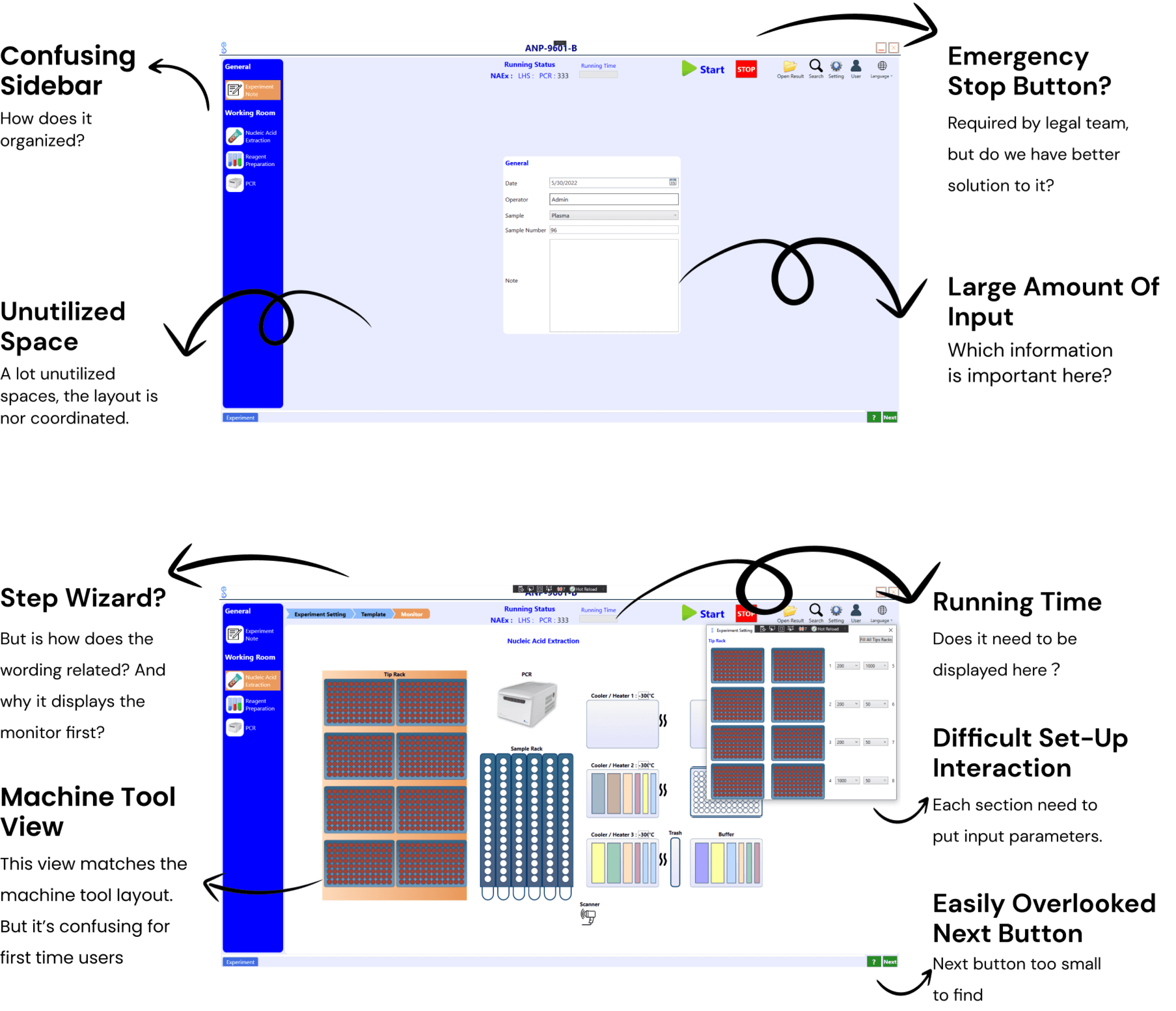
Reorganized the Information Architecture, simplifying the UI layout with sidebar & floating bar updates.
Transformed a 3-step machine setup into a unified, guided workflow.
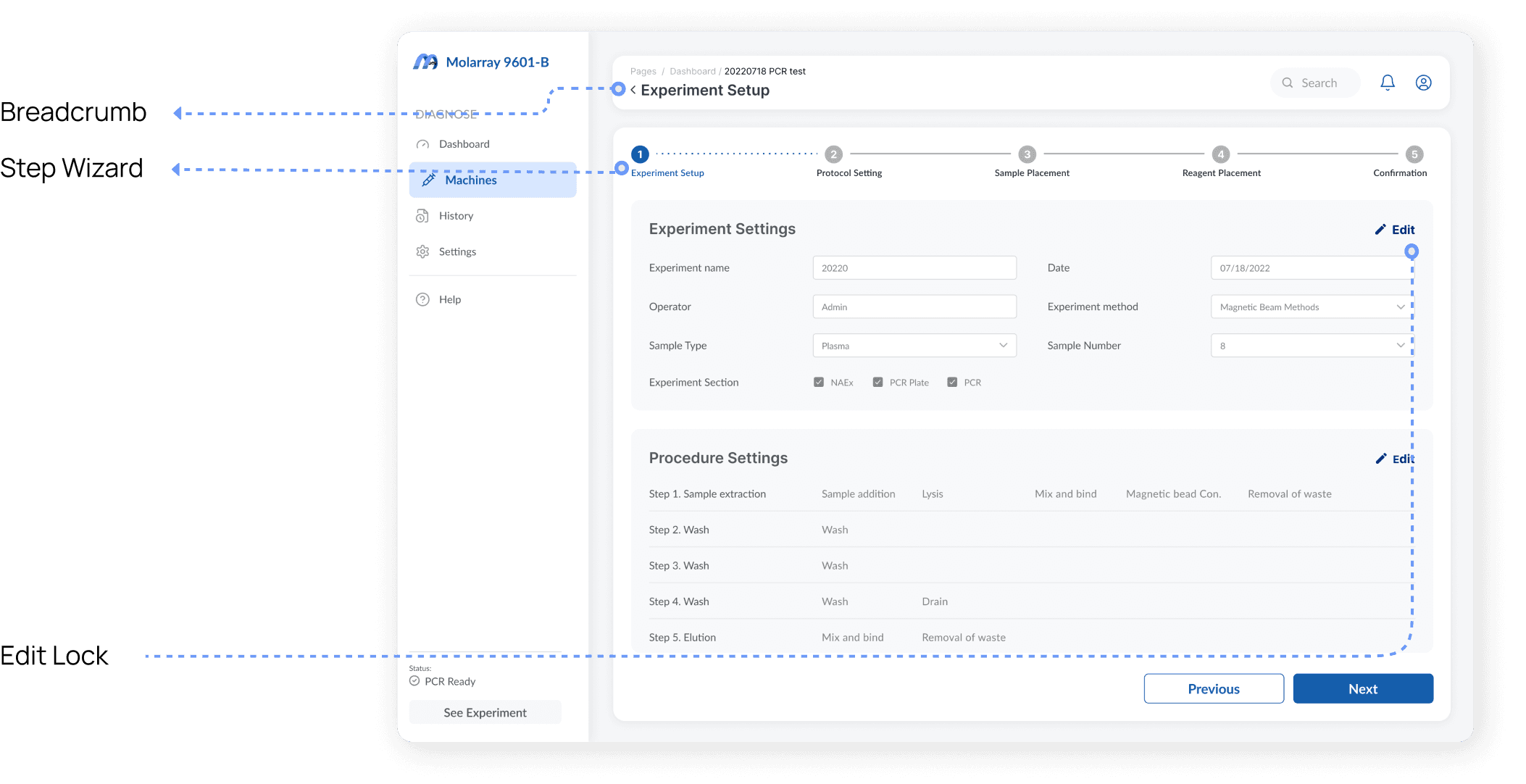
Introduced step-by-step wizard with progress tracking and inline guidance.
➡ Result: Reduced setup time by ~40%, increased completion rate on first attempt.
Reorganized the Information Architecture, simplifying the UI layout with sidebar & floating bar updates.
Transformed a 3-step machine setup into a unified, guided workflow.
Introduced step-by-step wizard with progress tracking and inline guidance.
➡ Result: Reduced setup time by ~40%, increased completion rate on first attempt.
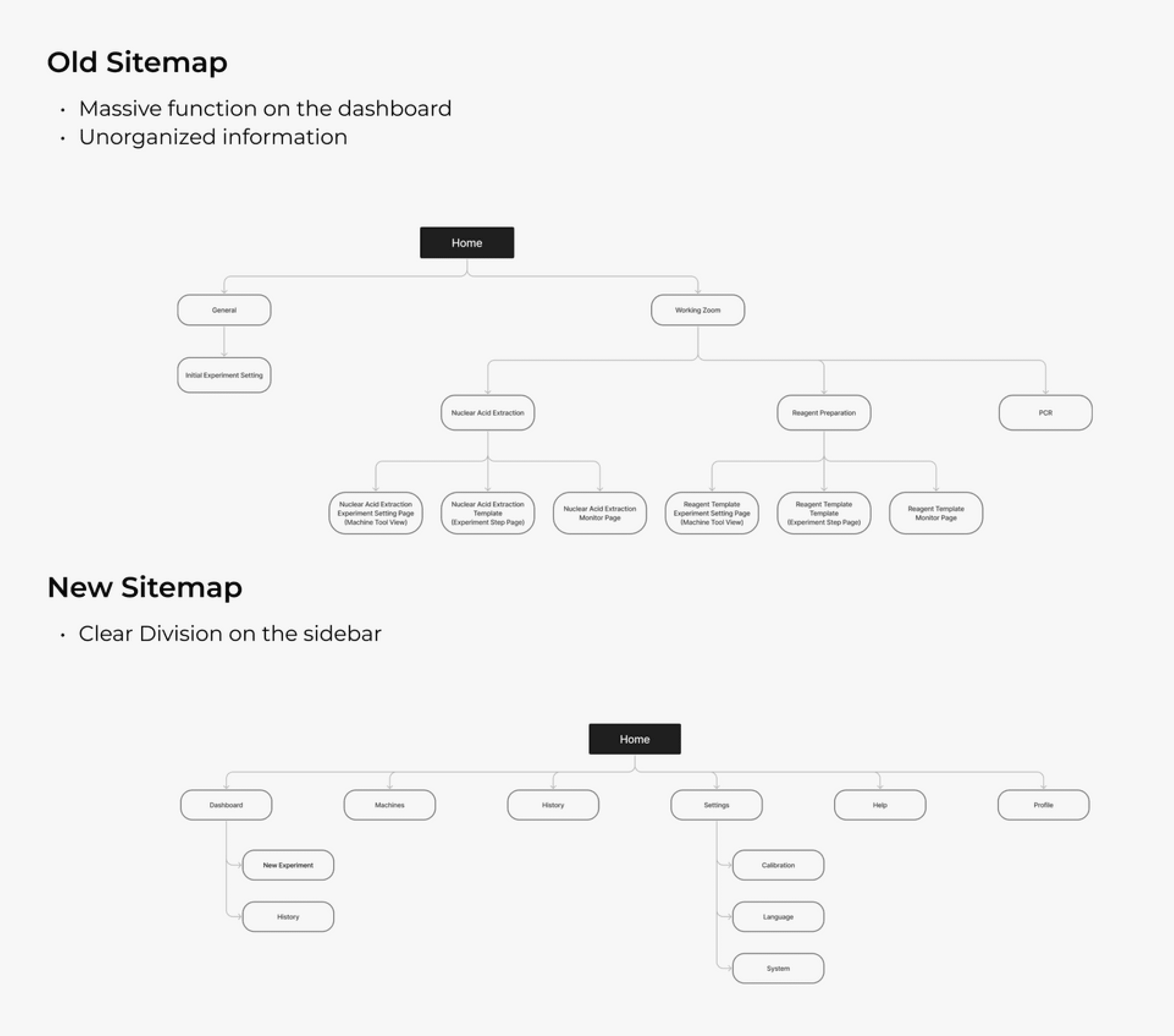
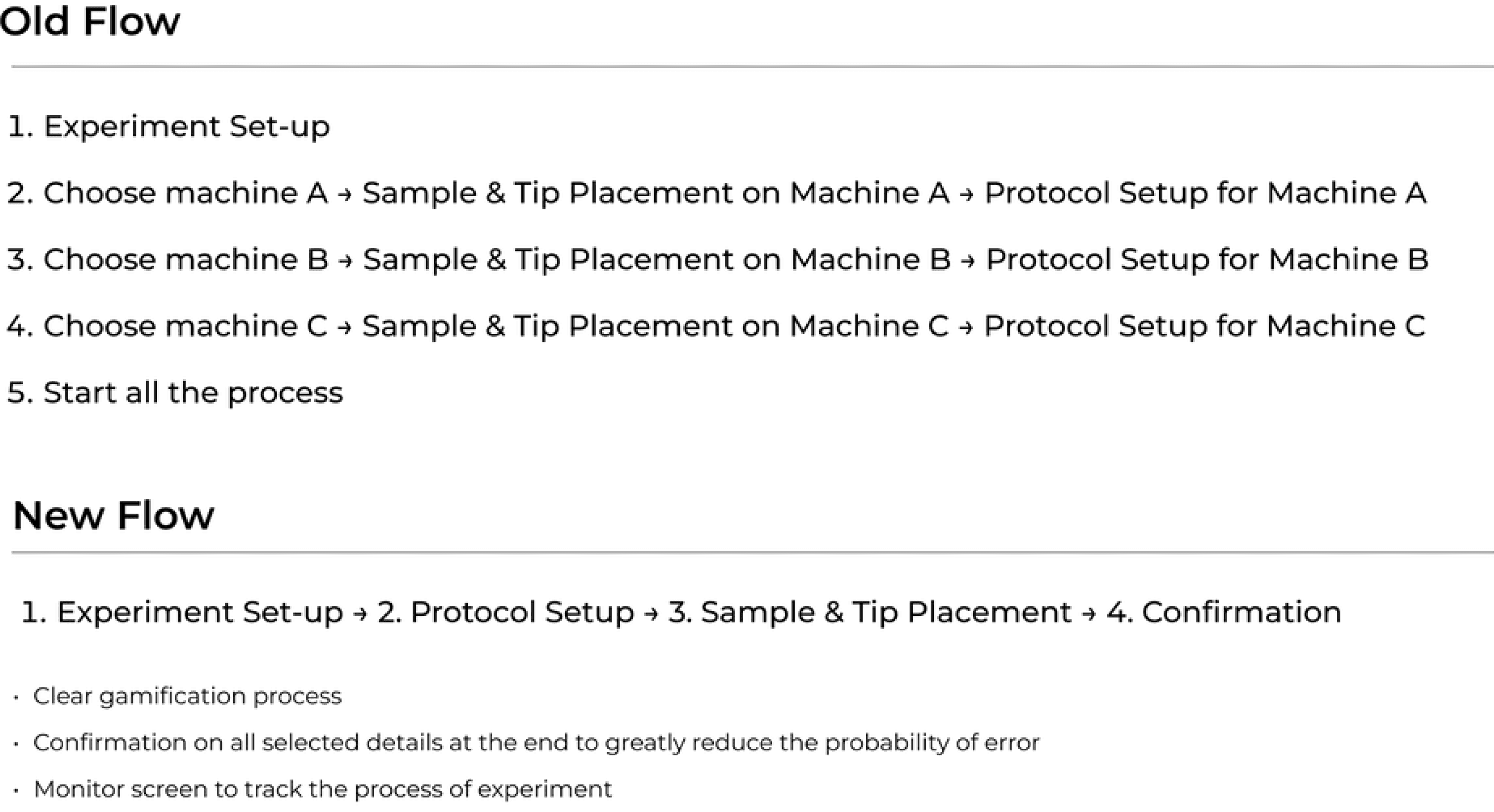
Furthermore, I made significant improvements to the workflow. In the previous version, the machine was divided into three sections, necessitating the technician to set it up 3 separate times. However, by aligning with the mindset of the biological technician and their experimental approach, I consolidated the workflow into a single streamlined process for setting up the protocol.The chart below illustrates the simplification of the process, transitioning from 3 separate set-up processes to a unified and integrated approach guided by step wizards. This visual representation helps to clearly demonstrate the enhanced efficiency and user-friendliness of the new system.
Furthermore, I made significant improvements to the workflow. In the previous version, the machine was divided into three sections, necessitating the technician to set it up 3 separate times. However, by aligning with the mindset of the biological technician and their experimental approach, I consolidated the workflow into a single streamlined process for setting up the protocol.The chart below illustrates the simplification of the process, transitioning from 3 separate set-up processes to a unified and integrated approach guided by step wizards. This visual representation helps to clearly demonstrate the enhanced efficiency and user-friendliness of the new system.
2. Wireframes & Interaction Design
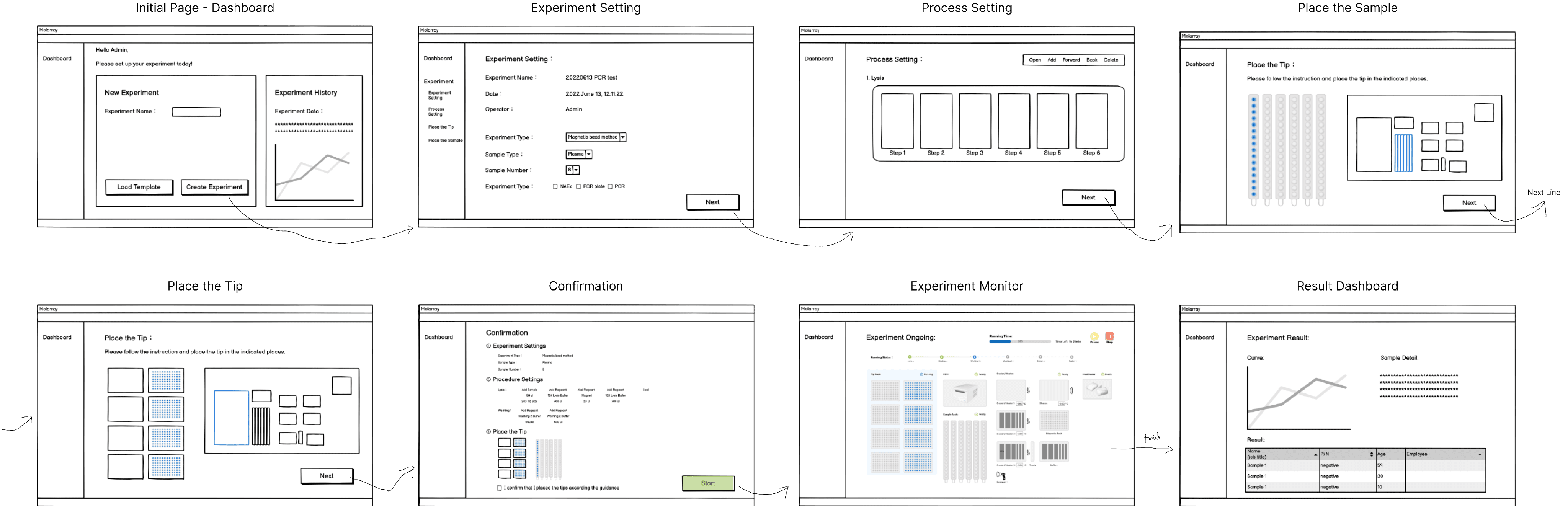
Collaborated closely with engineers to ensure feasibility and alignment with coding conventions. Key features included:
🧭 Step-by-step setup wizard with contextual tooltips
✅ Prominent Next Step button to guide progression
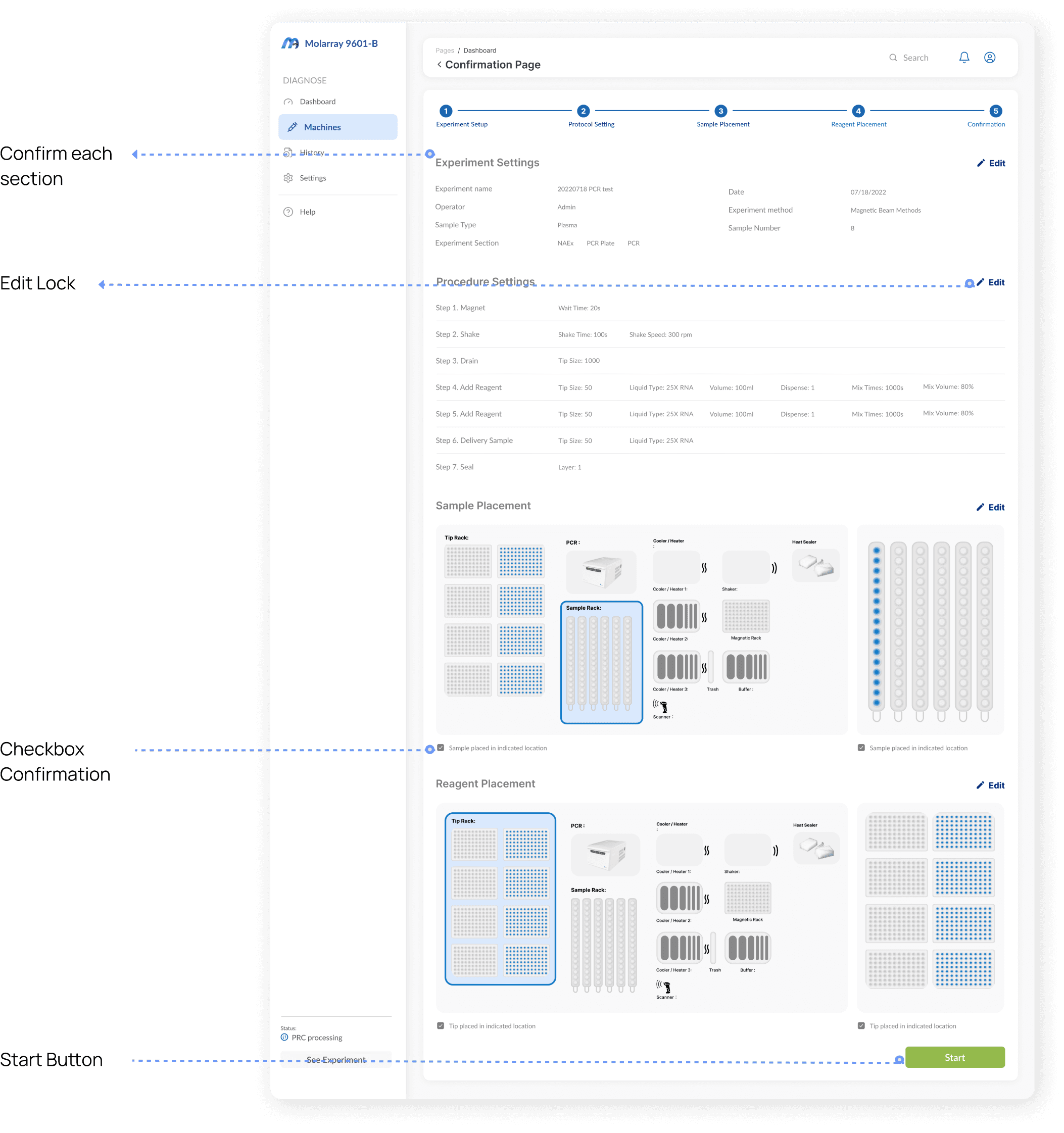
🔬 Smart confirmation screen to verify inputs before execution
🧠 Plain language & visuals to support users with varied technical backgrounds
3. UI Re-stucture
Design Result
Design Result
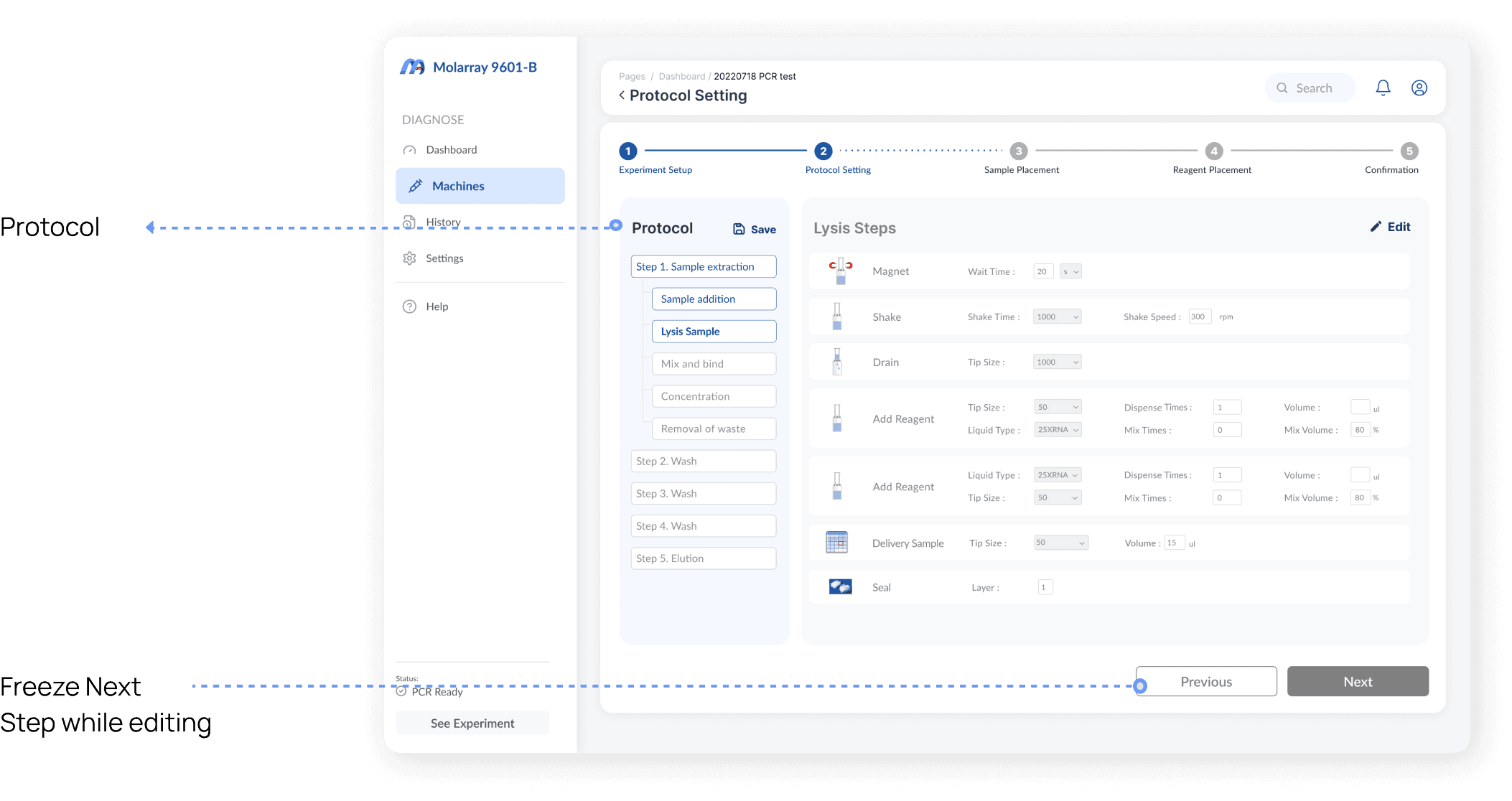
Step 1 - 4
Experiment Set-up
Protocol Set-up
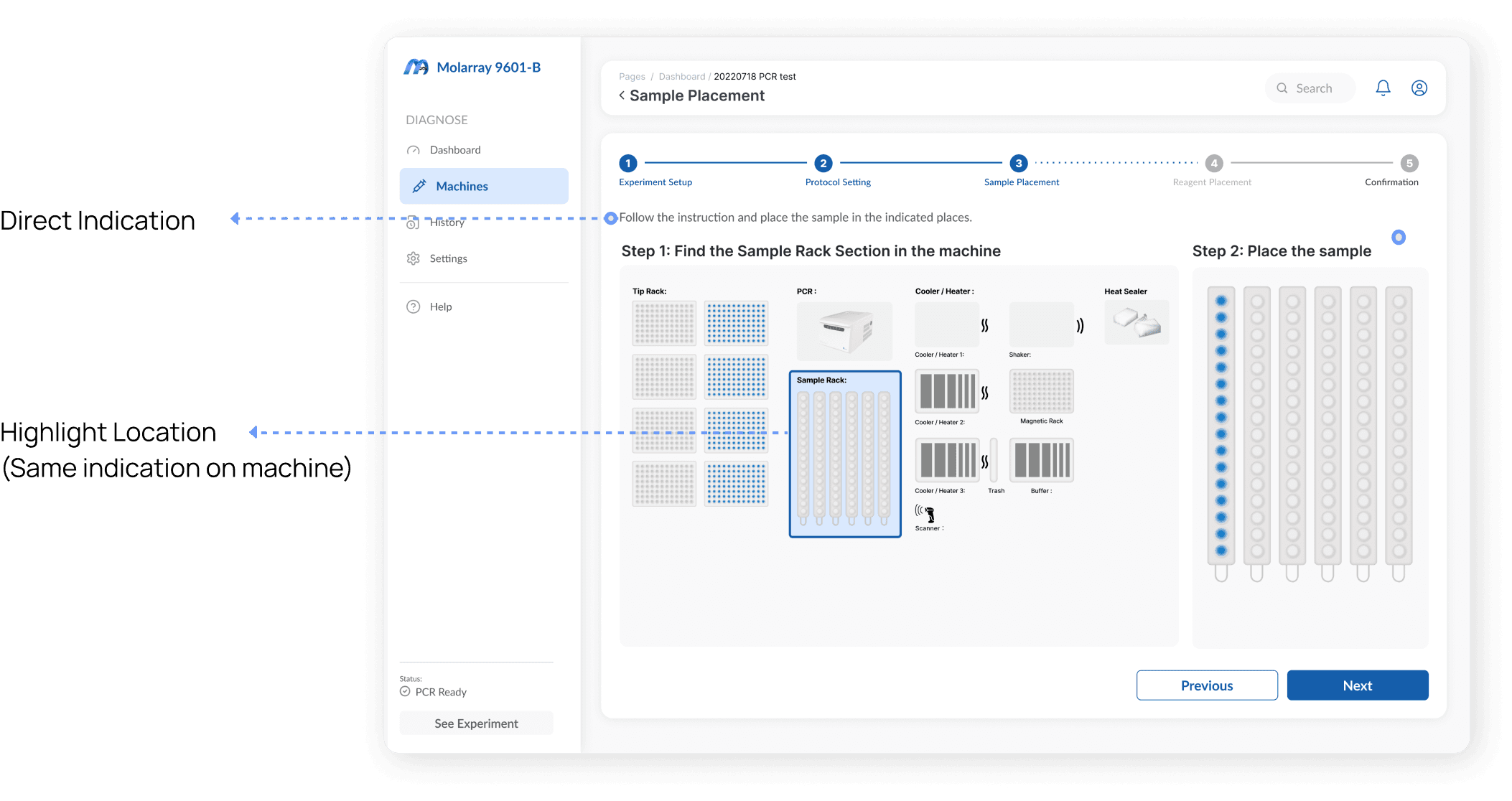
Sample & Tip Placement
Confirmation
Step 1 - 4
Experiment Set-up
Protocol Set-up
Sample & Tip Placement
Confirmation
Workflow

Step 5 - 6
Monitor
Result
Step 5 - 6
Monitor
Result
Experiment Set-up
Protocol Setting
Sample Placement
Confirmation & Validation
Monitor Screen
Results & Data Dashboard
Prototype
Prototype
Discover multiple solutions and deliver the final version that fits the developer habit and coding convention. The final version integrated the updated style guide and improve the accessbility.
Discover multiple solutions and deliver the final version that fits the developer habit and coding convention. The final version integrated the updated style guide and improve the accessbility.
Design Outcomes
Design Outcomes
✅ +45% increase in active users
✅ Significant drop in setup errors
✅ Improved technician satisfaction scores (internal post-launch survey)
✅ +45% increase in active users
✅ Significant drop in setup errors
✅ Improved technician satisfaction scores (internal post-launch survey)
Key Take-away
Key Take-away
Short-term Impact:
Boosted adoption within the first 4 months
Streamlined experiment throughput and reduced support tickets
Short-term Impact:
Boosted adoption within the first 4 months
Streamlined experiment throughput and reduced support tickets
Long-term Opportunities:
Validate dashboard redesign through A/B testing
Expand user research to include diverse lab environments
Mature design system for scalable product line expansion
Foster cross-functional UX culture through design enablement workshops
Long-term Opportunities:
Validate dashboard redesign through A/B testing
Expand user research to include diverse lab environments
Mature design system for scalable product line expansion
Foster cross-functional UX culture through design enablement workshops
Ready to build something amazing?
I'd love to connect with you!
Ready to build something amazing?
I'd love to connect with you!
Ready to build something amazing?
I'd love to connect with you!